Shoes wear before they look done
Foam, outsole grip, and stability can fade gradually over hundreds of kilometers. Tracking usage makes that wear visible before a pair becomes a guess.
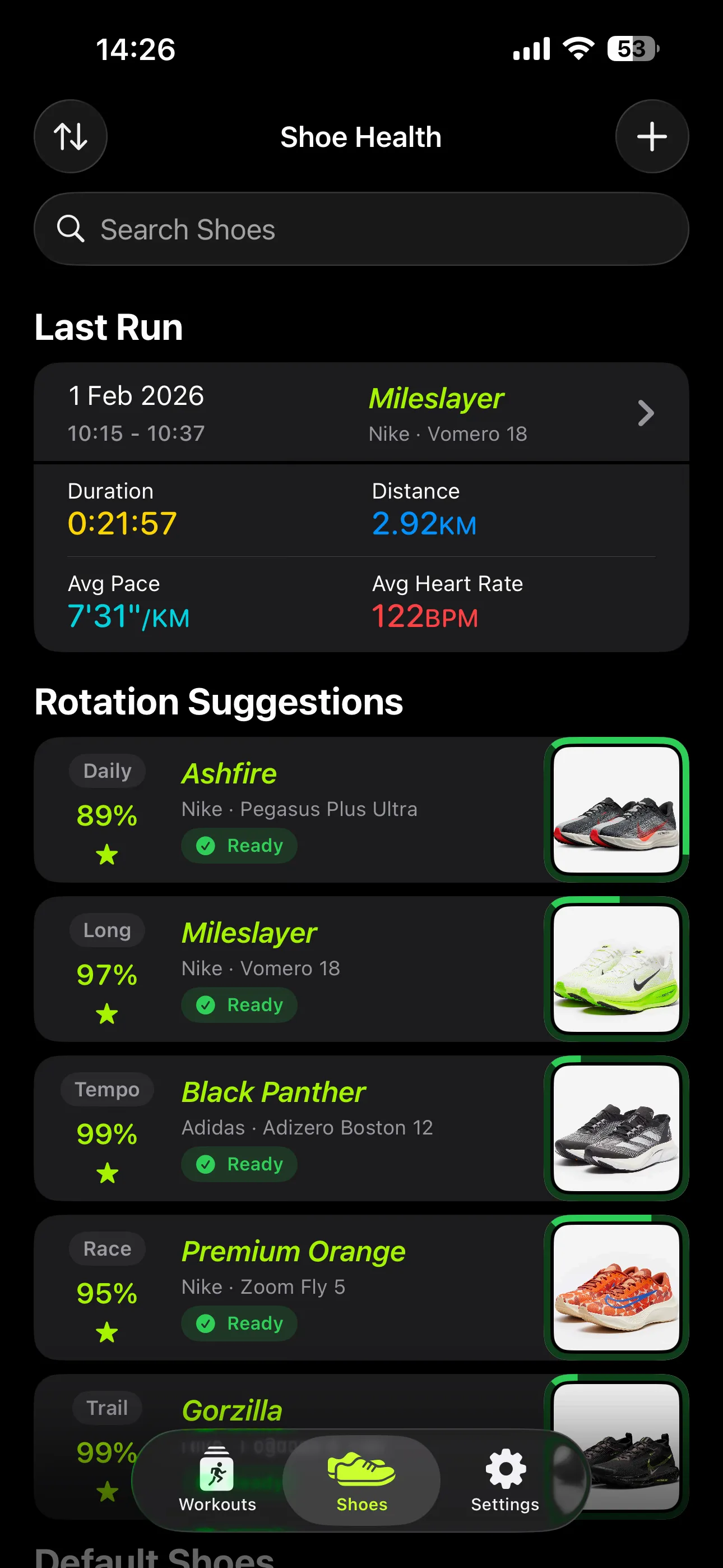
Shoe Health — track your shoes, rotate every pair, run smarter.
Import your runs from Apple Health, then assign each one to the pair you wore. Every shoe builds its own mileage and wear as you go — with rotation suggestions and replacement estimates when you need them.
Free to start · Up to 3 shoes · Health data stays private
Why it matters
Most runners remember mileage only when a pair already feels flat. A smart rotation helps you notice wear earlier, use each shoe for the job it was bought for, and replace pairs on purpose instead of in a hurry.
New to this? Start with our guide on building a running shoe rotation, or browse all running shoe guides.
Research note
A prospective study of 264 recreational runners found that using multiple running shoes was associated with a lower injury hazard (HR 0.614), roughly a 39% reduction.
Read the Malisoux et al. study
A good rotation helps you
Foam, outsole grip, and stability can fade gradually over hundreds of kilometers. Tracking usage makes that wear visible before a pair becomes a guess.
Each shoe stresses your body a little differently — drop, foam, geometry — so the same muscles, tendons, and joints aren’t loaded the same way every run. Rotating pairs spreads that mechanical stress across more tissues.
A long run, recovery jog, tempo session, and race do not feel the same. Matching the right pair to the right workout keeps training more intentional.
Features
Built around the way you actually train — not a generic activity log.
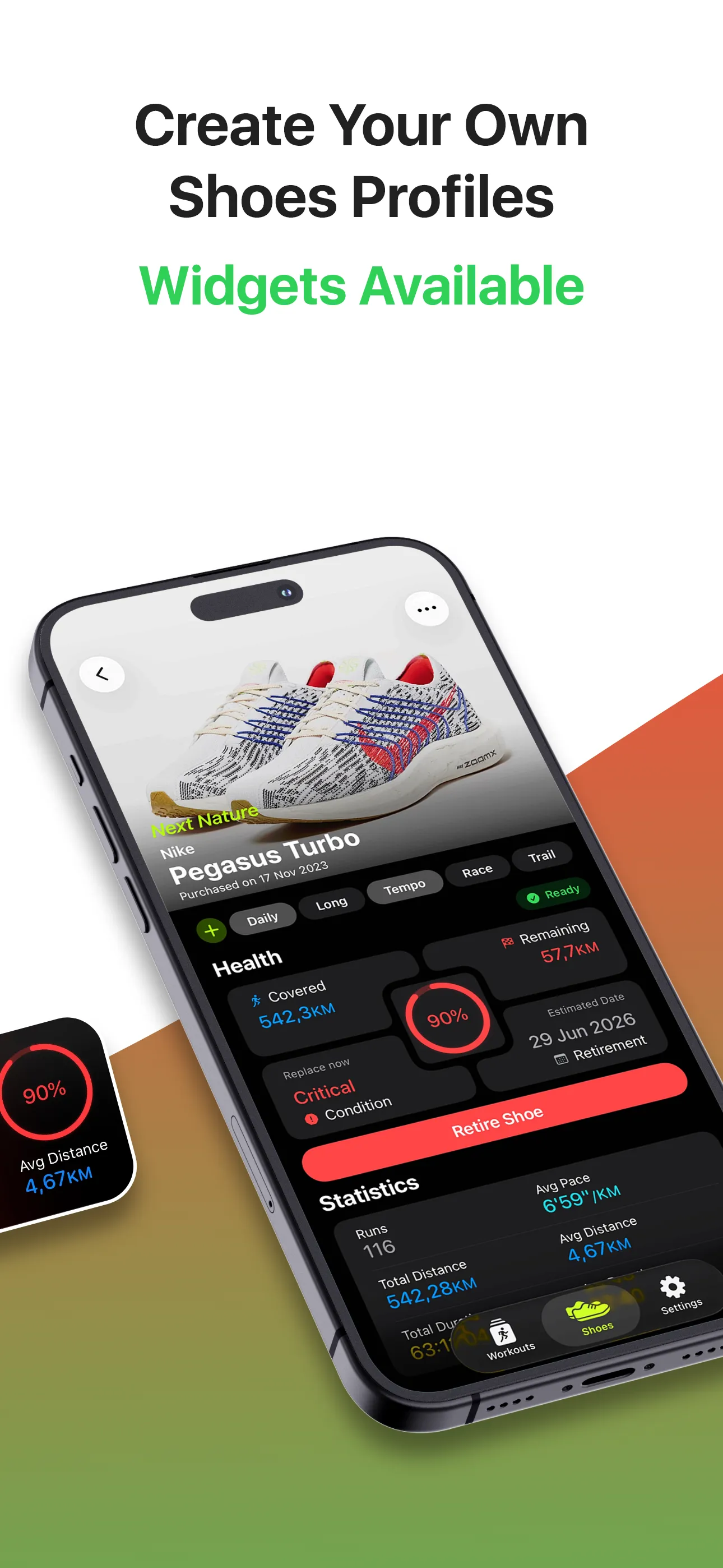
Brand, model, photo — every pair, all yours.
Learn more680 models with real specs, ready to add.
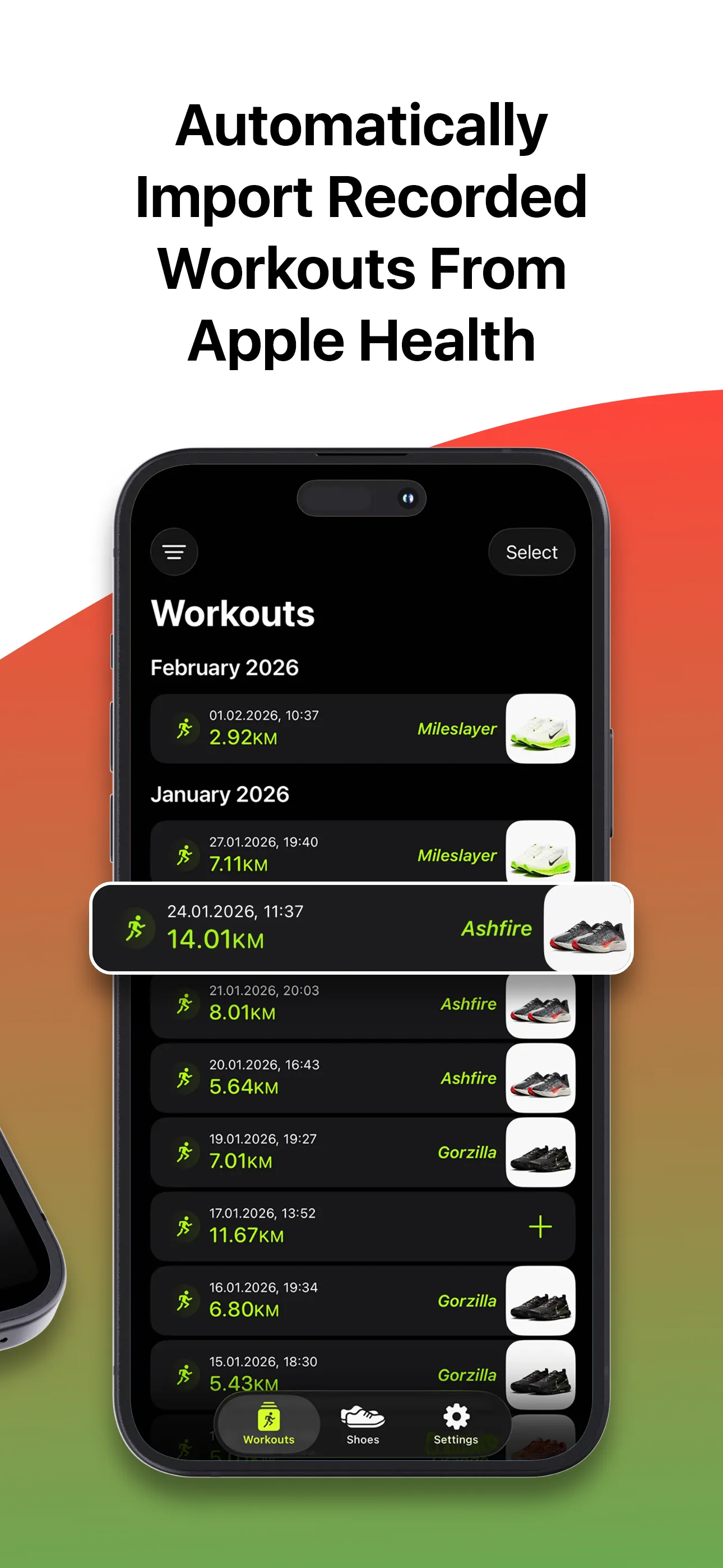
Learn moreWorkouts flow in. No setup.
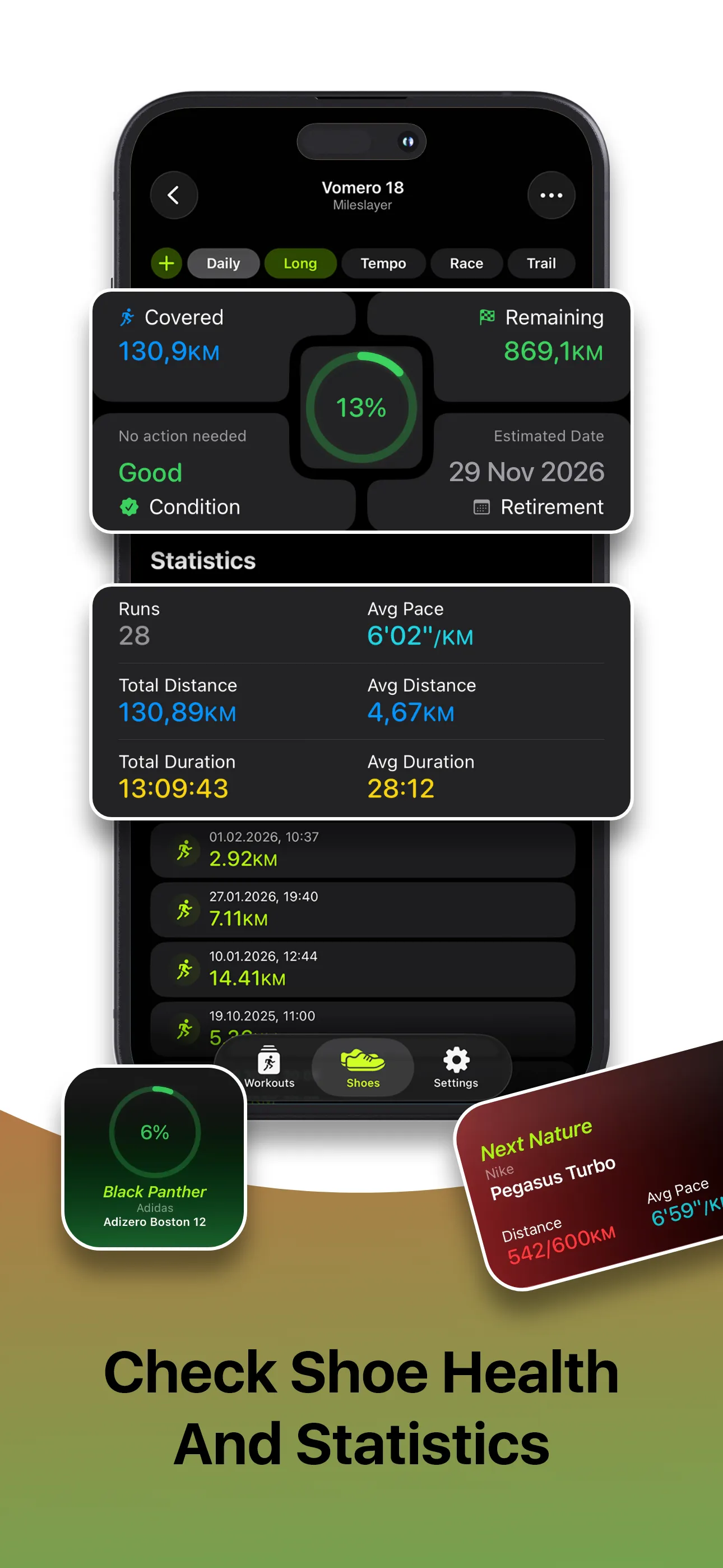
Learn moreWatch each pair age in real time.
Learn moreKnow when each pair is ready to run again.
Learn moreReplace on purpose, not in panic.
Learn moreNudges that respect your rotation.
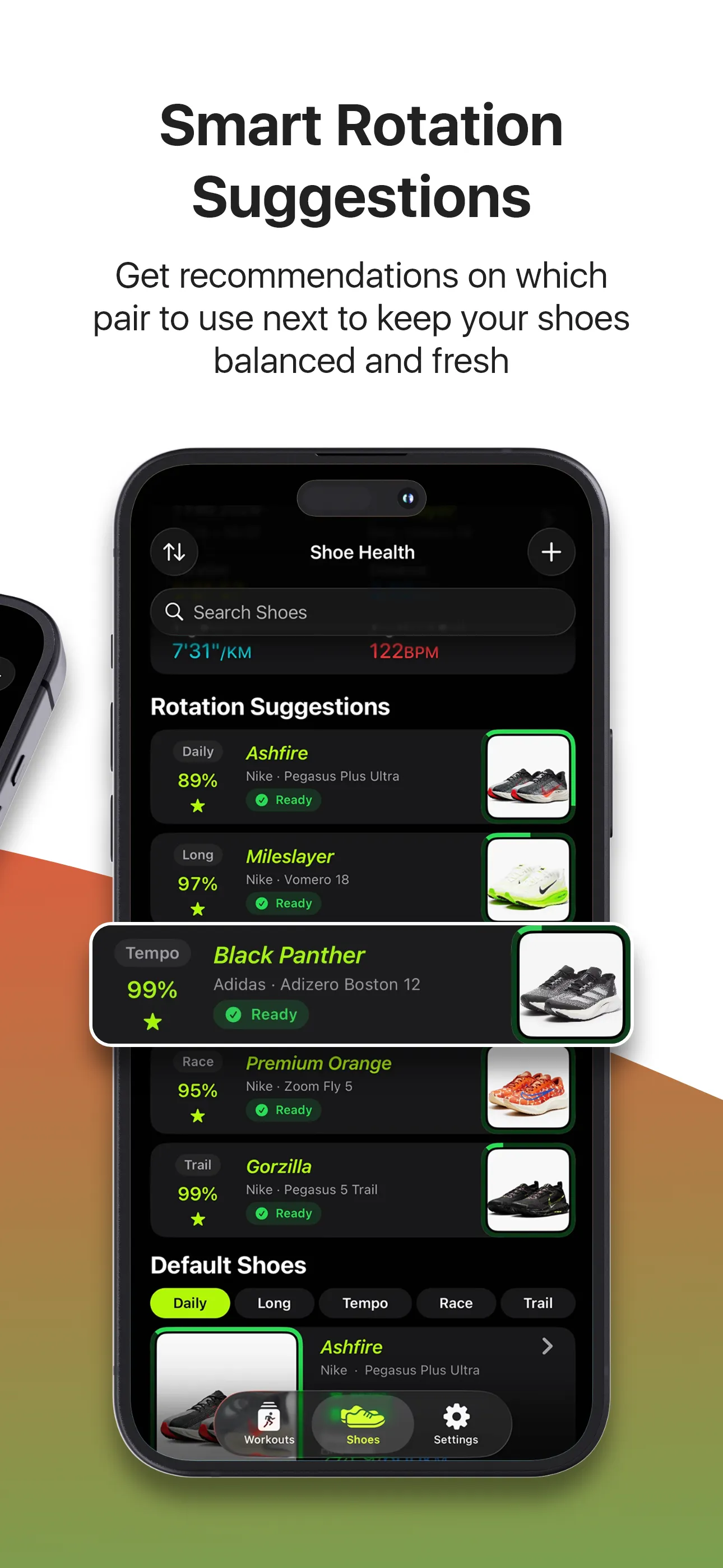
Learn moreKnow which pair to lace up next.
Learn moreAuto-suggested from your catalog pick — Daily to Trail.
Learn moreGlance at your fleet anywhere.
Learn moreHow it works
Shoe Health fits into the routine you already have: add your pairs once, let workouts sync, and check in when you need a better next-shoe decision.
Give Shoe Health access to your workouts and running distance so completed runs start flowing in automatically instead of being logged by hand.
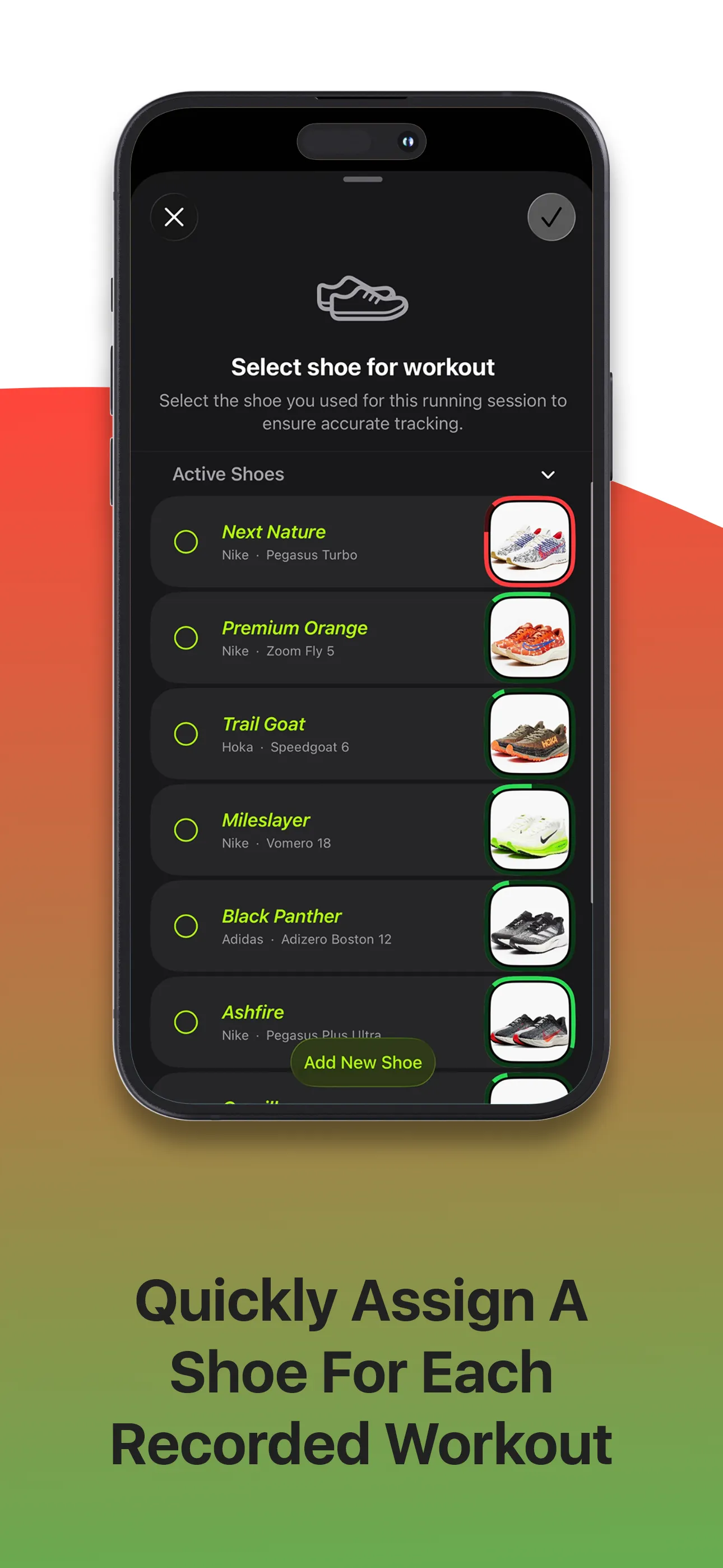
Create a profile for each pair with brand, model, nickname, purchase date, photo, and run type so every shoe starts with its own history.
Assign default and suitable pairs for daily, long, tempo, race, and trail runs so the app can guide you toward the best option for each workout.
Workouts import automatically from Apple Health; you assign each one to the pair you wore (or your default shoe). That pair then builds its own mileage, pace, duration, wear level, and retirement estimate.
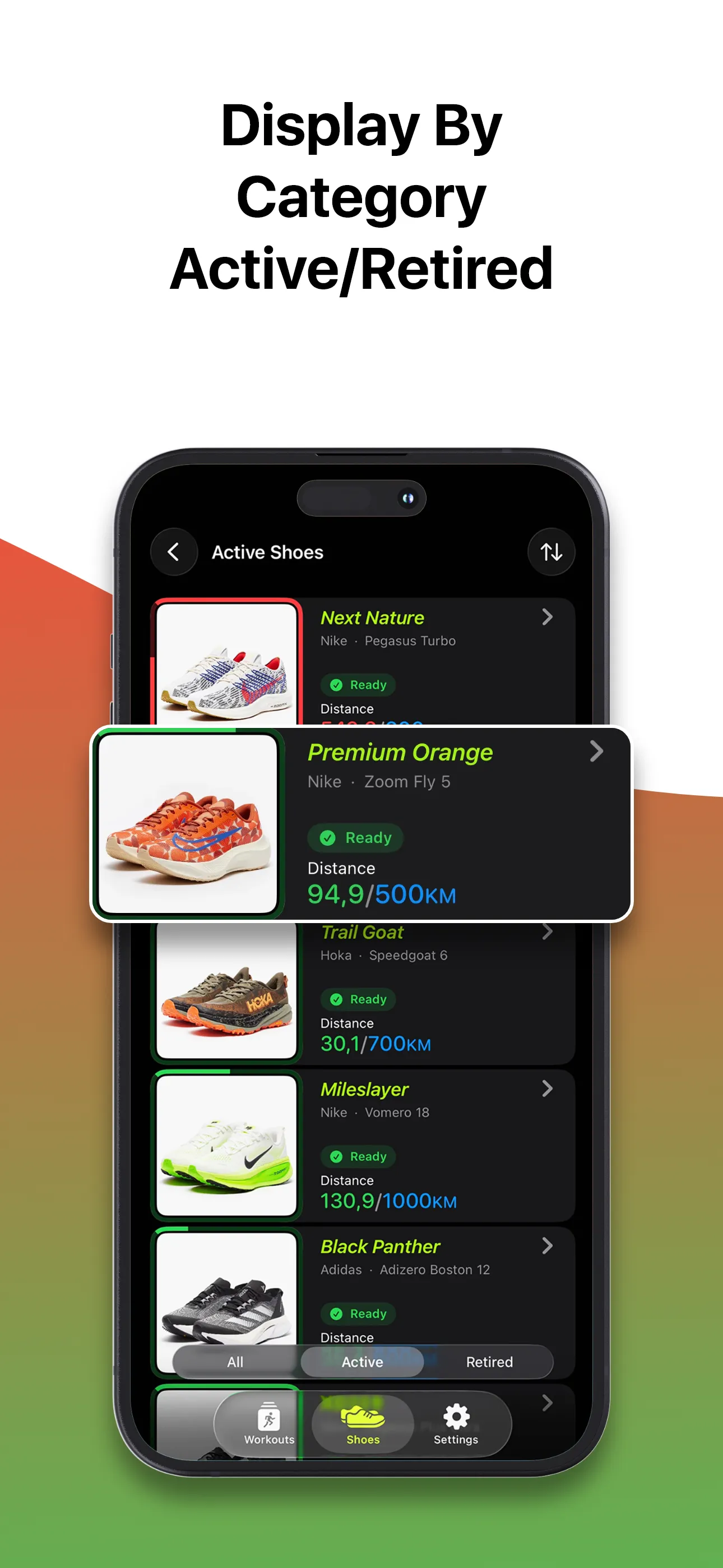
Open the app or widget to see which pair is freshest, which one needs rest, and which shoes are getting close to retirement before they become a problem.
Get timely nudges when a pair is overused, crosses a wear threshold, needs recovery time, or is ready to go back into rotation.
A closer look
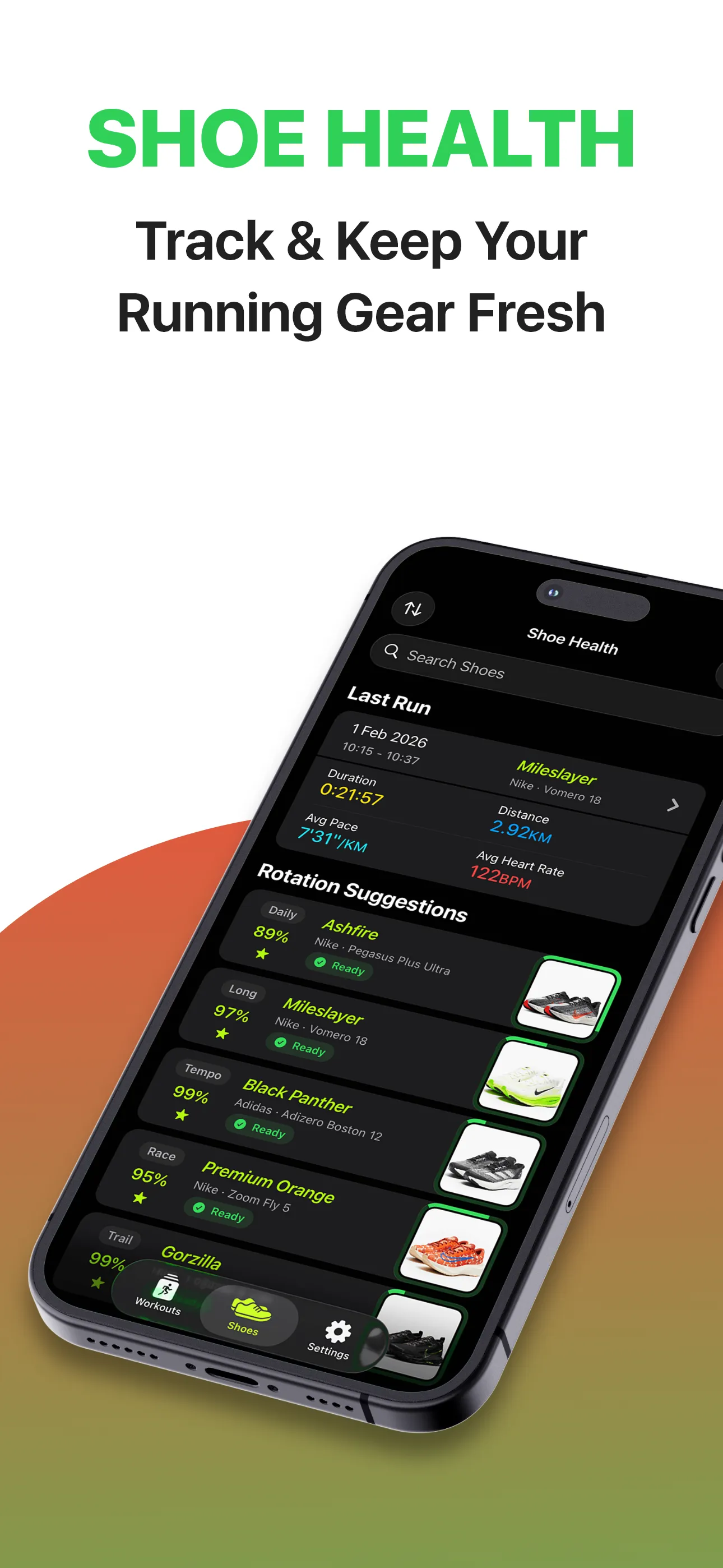
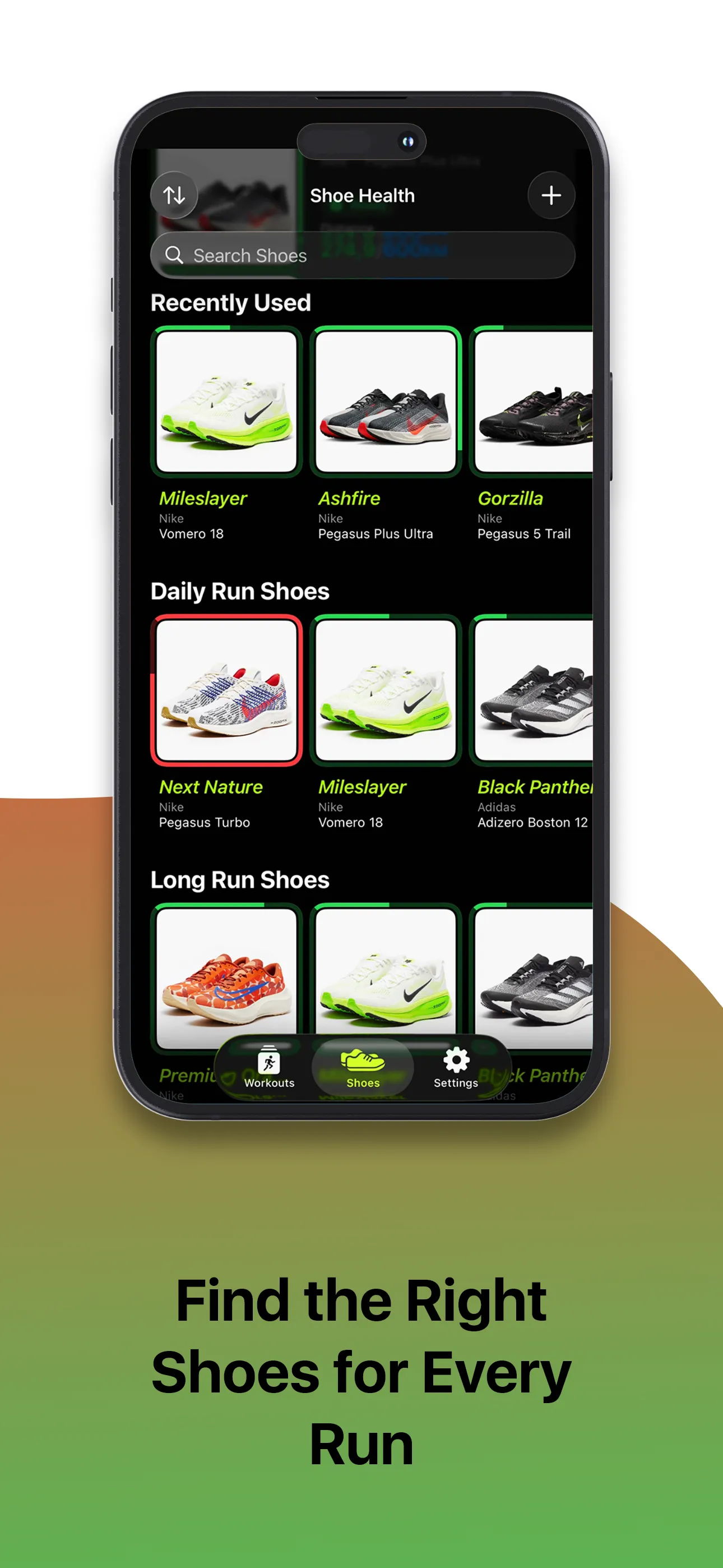
Dark-first, glanceable, and made for one-thumb use during the cool-down.
Widgets
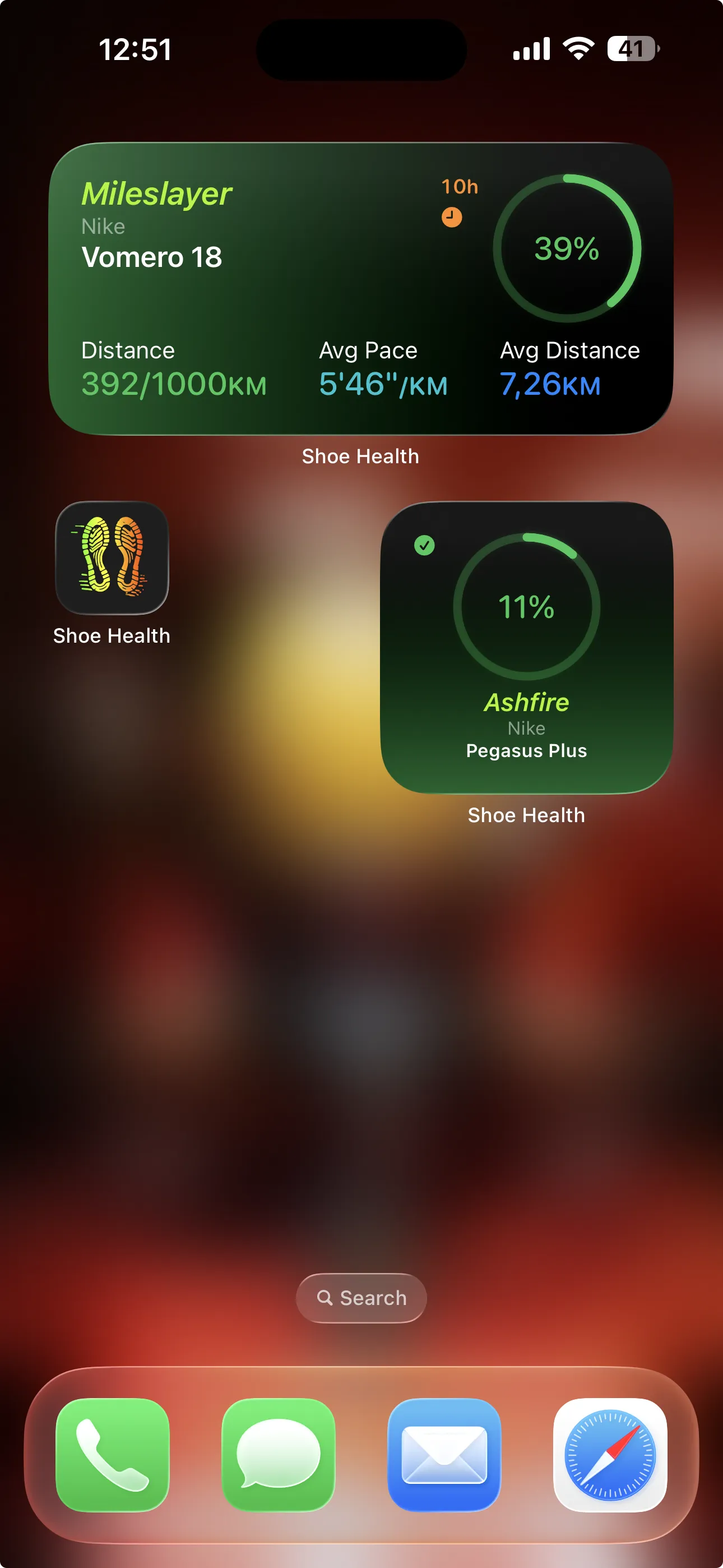
Pin the Shoe Health widget to your Home Screen or Lock Screen to see remaining mileage, condition, and the next pair due for rotation — without opening the app.
Pricing
Start with three shoes for free. Upgrade once your collection — or your training — grows.
Everything you need to start tracking.
Try Premium risk-free
7-day free trial
Just $1.67 a month
Save 44% vs monthly
No renewals, ever
Pay once. Yours forever.
All Premium plans unlock
FAQ
No. Shoe Health works with any running workout that ends up in Apple Health — whether recorded on iPhone, Apple Watch, or imported from a third-party app.
Currently, the app only supports tracking running workouts imported from Apple Health.
The lifespan of a shoe is based on the total running distance from workouts imported from Apple Health. When you pick a shoe from the built-in catalog, a suggested lifespan tailored to its foam and category is pre-filled, which you can adjust at any time.
When adding a shoe, you can pick it from a built-in catalog of popular running shoes, or simply start typing and we’ll detect the model and offer to fill in the brand, model, a suggested lifespan, and recommended run types. Catalog shoes also show a specs section (foam, stack height, drop, plate, and weight) and let the app tailor lifespan and recovery estimates to the shoe’s construction. You can edit anything, and adding a shoe manually still works exactly as before.
For each run type we point you to the pair that’s the best choice right now, so you don’t have to wonder ‘which shoes today?’. The goal is to gently encourage you to rotate between pairs instead of always grabbing the same one. Rotating gives each shoe time to recover between runs, evens out the wear so no single pair breaks down early, and varies the cushioning and feel underfoot slightly from run to run — all things that can help reduce overuse injuries. It’s a friendly recommendation to support healthier running, never a rule you must follow.
Everything that helps protect you and your shoes: how recently each pair was used and whether it’s had time to recover, how worn it is, whether it suits the run you’re planning, and your default-shoe choice when you’ve set one. A rested, lightly worn pair that fits the run is suggested ahead of one you ran in yesterday or one nearing the end of its life, so the load is shared and no pair (or leg) is overworked.
It’s a simple confidence score from 0 to 100 that rolls everything above into one number. A higher percentage means that pair is the better pick right now — rested, in good shape, and well suited to the run. It’s there to make the choice easy at a glance: a helpful pointer, not a hard rule, so listen to how your body and your shoes feel too.
Recovery hours are our estimate of how long it’s ideal to let a pair rest before its next run, so its cushioning can settle and bounce back. We look at your recent runs in that shoe (how far, how fast, and how hard compared to its usual pace), how long ago you last wore it, how worn it is, and — for shoes from the catalog — how it’s built. Treat it as a gentle nudge, not a strict rule: while a pair still shows hours left, it’s a good moment to reach for a different shoe. Resting a pair lets the foam recover and spreads the pounding across your rotation instead of one shoe, which helps look after your legs and makes each pair last longer. It’s guidance to support good habits, not a guarantee or medical advice.
A default shoe allows you to quickly assign workouts by long pressing on new workout notifications, without navigating through the app. When a new workout is logged in Apple Health using another app, Shoe Health will notify you and let you assign it to the default shoe or any other shoe of your choice.
A default shoe is not mandatory, but the app will remind you if a Daily default shoe is not set. Other categories are not mandatory, but it is recommended to have at least a Daily default shoe set for convenience.
You will receive notifications about new workouts available for shoe assignment and updates on your shoes’ wear condition after assigning workouts to them.
Yes, the free version of the app allows you to add up to 3 shoes. To add more, you can upgrade to the Premium version.
Premium unlocks: unlimited shoes (the free version includes up to 3); the Long, Tempo, Race, and Trail run types (Daily is always free); smart rotation suggestions; and the ability to browse and list your shoes by run type. Premium also lets you set default shoes for those extra run types, assign them straight from new-workout notifications, and show them in widgets.
If you switch back to the free version, all shoes you added while using Premium will remain in the app, but they will be restricted. You won’t be able to edit them, add workouts, or set them as default shoes. You will only have access to up to 3 shoes. These 3 shoes are selected by specific rules in the following order: the default Daily shoe is included first (if set), followed by the most recently used shoes and then the most recently added shoes until the limit of 3 shoes is reached.
Only what it needs: running workouts, walking + running distance, step count, heart rate (display only), and running power (optional). You grant or revoke each permission anytime in iPhone Settings → Health → Shoe Health.
Your health and shoe data stays private: running workouts from Apple Health are processed on your device and never written to a database or sent to a third-party server, and your shoe profiles live on your device and in your private iCloud. Separately, the app uses standard marketing-attribution tools (including the Meta SDK) to measure which ads and campaigns bring runners to the app — this concerns app installs, not your health data, and you can limit it in iPhone Settings → Privacy & Security → Tracking. Full details are in our Privacy Policy.
Your shoe profiles live on your device and in your private iCloud container. Apple Health data is processed in-memory only — never written to a database, never sent to any third-party server.
Your shoe data is stored in iCloud and will automatically restore when you open the app after reinstalling, as long as you are signed in with the same Apple ID in the system settings.
Yes. Everything runs locally on your device. iCloud sync happens in the background when a connection is available.
Yes. Mark any pair as retired and Shoe Health keeps its full history visible under the Retired filter, separate from your active rotation.